
- Details
- Written by: INsane
- Category: Day of Defeat Mapping Guides
- Hits: 141


By default, Windows 11 cannot read GoldSrc .mdl engine files, displaying them as blank icons.
This guide will show you how to securely add native 2D visual previews directly inside your Windows Explorer folders—making it incredibly easy to browse custom map assets, player models, and weapon props without ever loading up a model viewer.
Note: Due to how modelers leave the default view, e.g.: like when you open a .mdl in a model viewer like Half – Life Asset Manager, you may see around 5% or so in a group with default views that are not at a good angle but on the whole the thumbnails are handy to have.
Step 1: Download the Files
- Go to the primary project repository by crskycode… Also... read on as I did strike a issue and made a mirror download with a fixed .bat file.
- Under the latest version (v1.0.0), download the main .zip archive file.
- Extract the downloaded folder to a location on your computer (e.g., your Downloads or Desktop folder).
Note: in that download you can see three files…
• GoldSrcModelThumbnailProvider64.dll - the actual .dll that matters.
• Register.bat – an OK but problematic “installer” to register the .dll above.
• Unregister.bat - like above but to remove it.
According to the author you just run Register.bat, but...I found Register.bat problematic, so below I have a better .bat file for Win 11.
If you find the same issue running that “Register.bat”… Read on and use Step 2 OR do it manually in the windows terminal (see below - "The Manual Alternative" ).
Step 2: Run a different (fixed) .bat file script
Issue to solve: The default registration script provided in the download contains a flaw when run on modern Windows 11 systems: it misidentifies administrative account permissions and tries to execute inside the wrong folder directory (C:\Windows\System32), throwing a false error.
To bypass this issue, you can use the fixed batch script in a special download here “Register_Fixed.bat”:
- Use the script…WITH CARE!!! This was OK for me on Win 11 Pro updated to the latest in Oct 2026.
Note you should exit any open folders, work or programs you have open or are working on, this is best done with nothing else running. - Drop this file directly into the extracted folder where GoldSrcModelThumbnailProvider64.dll is located.
- Right-click on Register_Fixed.bat and select Run as administrator.
- You should see this and a screen flicker after that, folders you have open will close!…
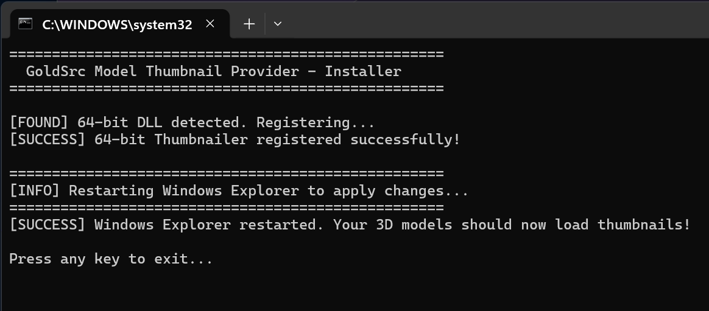
What this fixed script does automatically:
- It forces the system to look directly inside your current folder rather than jumping to System32.
- It completely strips away the broken permission logic check.
- It registers the dll cleanly and instantly restarts your explorer.exe
Step 3: Configure Windows 11 Explorer View
Once the installer window closes, you need to tell Windows to show the large graphics tiles instead of text details.
- Open up any folder containing Half-Life .mdl models.
- At the top of the file menu, click the View dropdown menu.
- Select either Large Icons or Extra Large Icons.
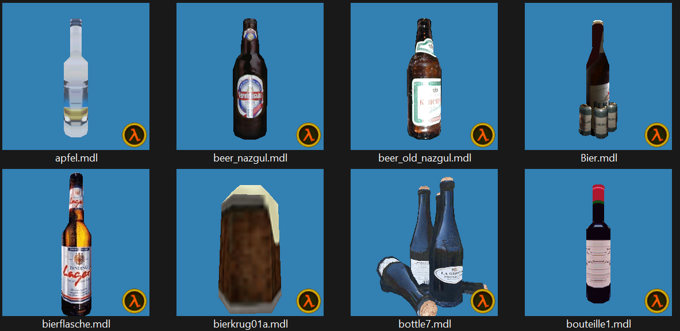
- Your models will instantly render into full 2D visual thumbnails right inside the grid layout…
The Manual Alternative
If you prefer not to use a downloaded executable or script, you can achieve the exact same result manually using the Windows native command shell:
- Click the Windows Start menu, type cmd, right-click Command Prompt, and choose Run as administrator.
- Navigate to your specific file path using the disk directory change parameter:cmd... cd /d "C:\Your\Extracted\Folder\Path\Here"
- Register the 64-bit shell extension library directly:cmd...regsvr32 GoldSrcModelThumbnailProvider64.dll
- Restart your desktop process via Task Manager (Ctrl + Shift + Esc) by finding Windows Explorer, right-clicking it, and selecting Restart.
Disclaimer: Please be sensible and use this at your own risk, you really need to understand most who use this are likely modelers and mappers with experience in these programs, the normal player...this is really not required.