
This is a mirror to preserve the older dod Beta versions for Linux.
It was found in this Reddit post by AEX10Playz (10 years ago)
This has no readme but the OP (like this mirror) is just preserving the files.
They are extremely rare now.
Sorry no readme... just a image of what's in this download... But do read below the image!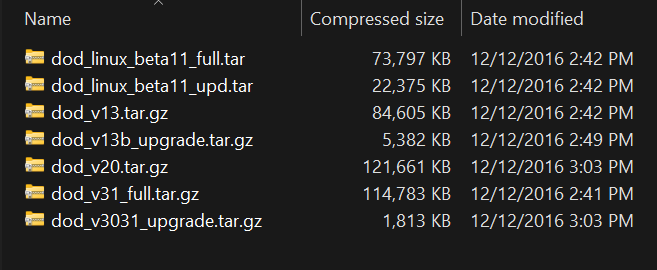
Possible to run this under Xash 3D?
I think this is the way...
Why Xash3D is better for this:
• No CD Keys Needed: Xash3D does not check for or require ancient WON/Steam CD key authentication.
• Pure Copy-and-Paste: It reads original Windows retail game files directly.
• Modern OS Friendly: It compiles flawlessly on modern 64-bit Linux distributions without requiring deprecated 32-bit system libraries.
How to use it for DoD Betas:
Method 1: The Quickest Way (Using the Enhanced AppImage)
If you want to skip compiling code and tracking down dependencies, the community-maintained Enhanced AppImage runs perfectly on modern Linux Mint and others.
Code:
./xash3d-fwgs-enhanced.AppImage -game dod -as
Why the -as flag matters here:
The -as flag tells Xash3D to look for or run internal engine fallback logic rather than trying to execute the ancient native .so files compiled for Linux kernels from 20 years ago, saving users from instant desktop crashes.
Your folders/files should look like this...
xash3d/
├── xash3d-fwgs-enhanced.AppImage
├── valve/
└── dod/
This advice is not tested by me yet.... use with caution.
 DoD Alpha and Beta Linux